Tencent CAPTCHA can block registration, login, or form submission in Selenium, Playwright, and other E2E tests. If you control the application, use Tencent CAPTCHA test mode. Otherwise, solve the challenge through Captcha Solver and pass the returned object to the page callback.
This guide uses the official Python SDK and JavaScript SDK. A separate example repository contains runnable synchronous and asynchronous examples for both languages.
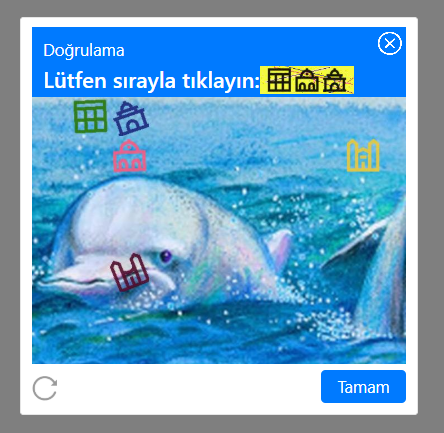
Tencent CAPTCHA Data#
You need three values:
websiteURL— the URL of the page with the CAPTCHA;appId— the Tencent CAPTCHA identifier;clientKey— your Captcha Solver API key.
Tencent CAPTCHA uses appId, not websiteKey. Find it in the widget configuration on the page.
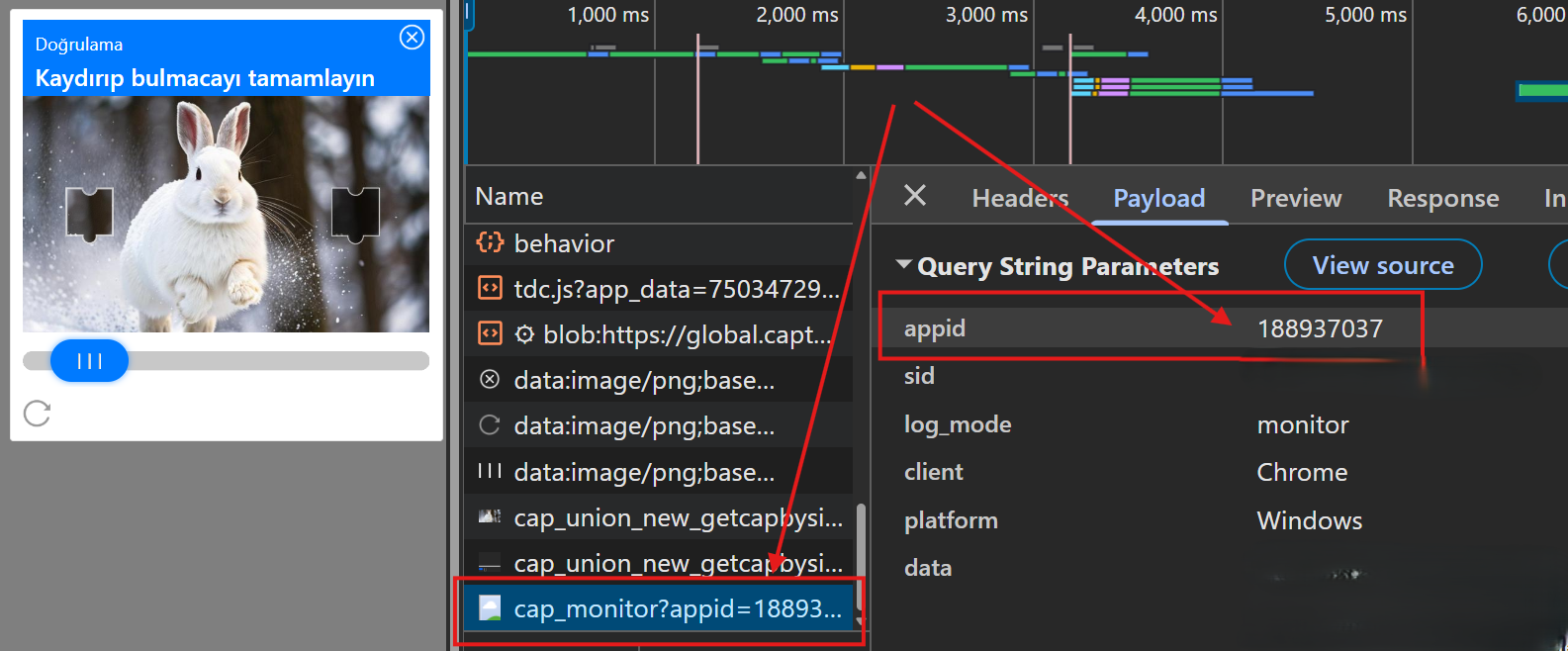
For example:
new TencentCaptcha("YOUR_APP_ID", onSolved);
Store the API key in the CAPTCHA_API_KEY environment variable and replace YOUR_APP_ID with the value from the target page.
Choosing the Task Type#
Captcha Solver supports two Tencent task types:
TencentTaskProxyless— solve without a client proxy;TencentTask— solve through your proxy.
Use TencentTaskProxyless unless the target requires a specific IP or session. TencentTask supports http, socks4, and socks5 proxies. Proxy credentials are optional.
Installing the SDKs#
Python:
pip install captcha-solver-api
JavaScript:
npm install @captcha-solver-api/javascript-sdk
Set the API key before running an example.
Linux and macOS:
export CAPTCHA_API_KEY=your_client_key
Windows PowerShell:
$env:CAPTCHA_API_KEY="your_client_key"
Python: Synchronous Example#
import os

from captcha_solver_api import CaptchaClient
from captcha_solver_api.tasks import TencentTaskProxyless

client = CaptchaClient(os.environ["CAPTCHA_API_KEY"])

solution = client.solve(
    TencentTaskProxyless(
        websiteURL="https://example.com/register",
        appId="YOUR_APP_ID",
    )
)

print(solution)
Python: Asynchronous Example#
import asyncio
import os

from captcha_solver_api import AsyncCaptchaClient
from captcha_solver_api.tasks import TencentTaskProxyless


async def main():
    client = AsyncCaptchaClient(os.environ["CAPTCHA_API_KEY"])
    solution = await client.solve(
        TencentTaskProxyless(
            websiteURL="https://example.com/register",
            appId="YOUR_APP_ID",
        )
    )
    print(solution)


asyncio.run(main())
JavaScript: Promise Example#
import { CaptchaClient, Tasks } from '@captcha-solver-api/javascript-sdk';

const client = new CaptchaClient({
  clientKey: process.env.CAPTCHA_API_KEY
});

const task = new Tasks.TencentTaskProxyless({
  websiteURL: 'https://example.com/register',
  appId: 'YOUR_APP_ID'
});

client.solve(task)
  .then((solution) => console.log(solution))
  .catch((error) => console.error(error));
JavaScript: Async/Await Example#
import { CaptchaClient, Tasks } from '@captcha-solver-api/javascript-sdk';

const client = new CaptchaClient({
  clientKey: process.env.CAPTCHA_API_KEY
});

try {
  const solution = await client.solve(
    new Tasks.TencentTaskProxyless({
      websiteURL: 'https://example.com/register',
      appId: 'YOUR_APP_ID'
    })
  );
  console.log(solution);
} catch (error) {
  console.error(error);
}
The SDK solve() method creates the task, polls its status, and returns the completed solution.
Solving Through a Client Proxy#
Use TencentTask instead of TencentTaskProxyless and provide the proxy fields. The same fields are available in both SDKs:
const task = new Tasks.TencentTask({
  websiteURL: 'https://example.com/register',
  appId: 'YOUR_APP_ID',
  proxyType: 'http',
  proxyAddress: '1.2.3.4',
  proxyPort: 8080,
  proxyLogin: 'proxy_user',
  proxyPassword: 'proxy_password'
});
Custom Tencent CAPTCHA Script URL#
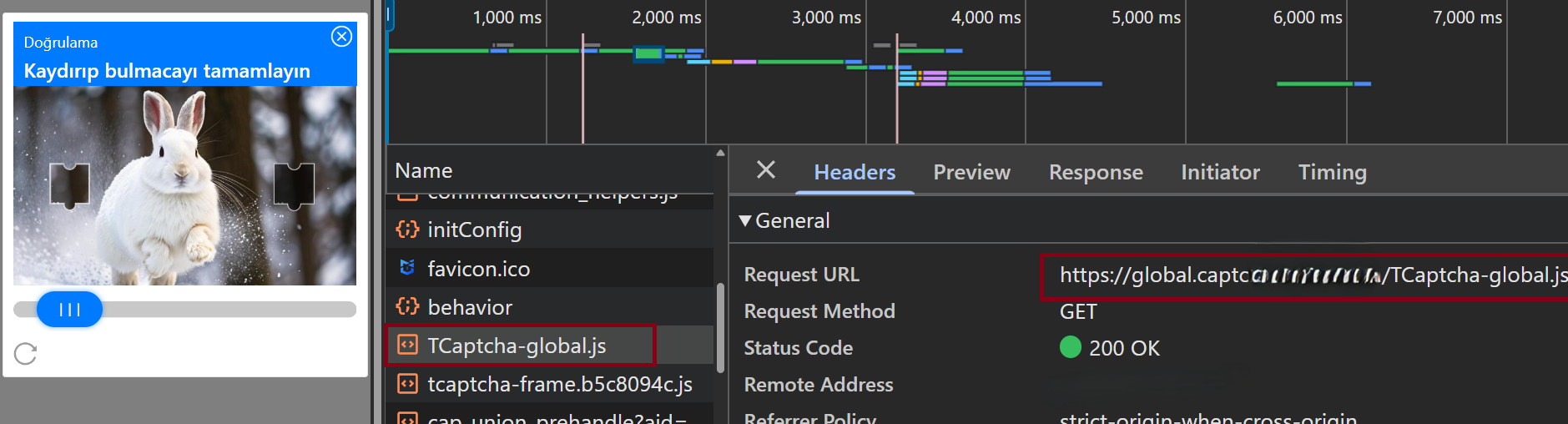
If the page loads Tencent CAPTCHA from a custom script URL, pass it in captchaScript:
const task = new Tasks.TencentTaskProxyless({
  websiteURL: 'https://example.com/register',
  appId: 'YOUR_APP_ID',
  captchaScript: 'https://example.com/custom/TCaptcha.js'
});
Use captchaScript only when the page actually loads a non-default Tencent CAPTCHA script.
Passing the Result to the Callback#
Captcha Solver returns a Tencent-compatible result object:
const solution = {
  appid: "...",
  ret: 0,
  ticket: "...",
  randstr: "..."
};
Pass the complete object to the callback registered by the page:
onSolved(solution);
The task parameter is named appId, while the returned field is appid. This difference is expected. Captcha Solver returns the result but does not submit the form. Your Selenium or Playwright test must invoke the real page callback and continue the flow.
Integration Flow#
- Open the page containing Tencent CAPTCHA.
- Read the
appIdfrom the page configuration. - Create
TencentTaskProxylessorTencentTask. - Call
solve(). - Pass the complete result to the page callback.
- Submit the form and continue the test assertions.
Request the solution immediately before form submission and use it on the same page where the CAPTCHA was created.
Resources#
- Captcha Solver Python SDK
- Captcha Solver JavaScript SDK
- Python and JavaScript Tencent examples
- Tencent CAPTCHA documentation
- Tencent CAPTCHA example repository
Summary#
Use TencentTaskProxyless for a regular solve or TencentTask when you need a client proxy. Both official SDKs provide a single solve() call and support Promise-based or async workflows. Pass the returned object unchanged to the page callback.